
8. Make the Stats view live
The Stats subpanel from step 7 reads its numbers once. Save a todo and they go stale until you reopen the view. Let’s make it react — update the instant a todo changes — with the reactivity layer.
The idea: the host watches the Todo entity and pushes an event; the webview listens and re-reads. Two small edits.
Host: watch the entity
The rpc factory gets a third argument, emit, for pushing events to its own
webview. Subscribe to Todo changes with watchEntity (from your generated
db.ts) and emit:
import { defineSubpanel } from '../shared/vsceasy';import { Todos, TodosRepo } from '../models/Todo';import { watchEntity } from '../helpers/db';
export default defineSubpanel<TodoStatsViewApi>({  title: 'Stats',  menu: 'todos',  rpc: (_vscode, _ctx, emit) => {    // SUBSCRIBE: any Todo change pushes an event to this webview.    watchEntity(Todos, () => emit('todos:changed'));
    return {      async stats() {        const now = Date.now();        const todos = await TodosRepo().findMany();        return {          total: todos.length,          done: todos.filter((t) => t.done).length,          overdue: todos.filter(            (t) => !t.done && t.dueDate && new Date(t.dueDate).getTime() < now,          ).length,        };      },    };  },});
Every ORM mutation (insert/upsert/update/delete/…) fires the entity’s
watchers — so saving or deleting a todo anywhere triggers this.
Webview: listen and re-read
In the Stats UI, call listen and re-fetch when the event arrives:
import { connectWebview, listen } from '../../../shared/vsceasy/client';
const api = connectWebview<TodoStatsViewApi>();
export function App() {  const [s, setS] = useState<{ total: number; done: number; overdue: number } | null>(null);
  useEffect(() => {    const refresh = () => void api.stats().then(setS);    refresh();    // LISTEN: re-read whenever the host says todos changed.    return listen(api, 'todos:changed', refresh);  }, []);
  // …render total / done / overdue…}
listen returns an unsubscribe function — returning it from useEffect cleans up
on unmount.
See it react
Reload, open the Todos container, and edit a todo — untick Done on the overdue one and save. The Stats numbers update on their own:
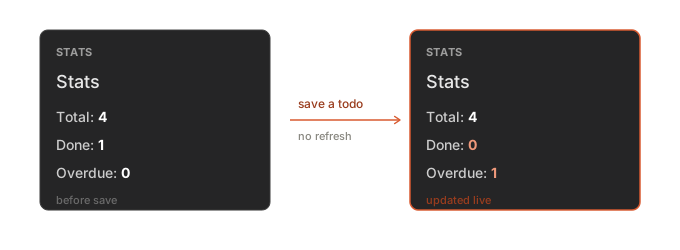
No Refresh button, no focus trick — the view tracks the data.
Two kinds of source
You watched an ORM entity here. The other source is a store — an observable value for non-ORM state:
vsceasy store add --name badgeCount --type numberimport { watch } from '../shared/vsceasy';import { badgeCount } from '../stores/badgeCount';
// host, in rpc():watch(badgeCount, () => emit('badge:changed', badgeCount.get()));
// anywhere:badgeCount.update((n) => n + 1); // every watcher firesSame watch → emit → listen flow, different source.
You’ve finished the tutorial
You built a complete extension — data, CRUD UI, a job, menus, status bar, sidebar
views, and a live-updating view — entirely from vsceasy commands.
- Reactivity guide — the full reference for
watch,watchEntity,defineStore, andlisten. - Command reference — every command and flag.