
3. Generate the CRUD UI
This is where the model becomes an app. One command scaffolds a service, a list panel, a form panel, the RPC contracts, and a menu to reach them.
Run it
vsceasy crud add --model todo --menu new:todos--menu new:todos creates a new activity-bar container called Todos and
wires the list + form into it. (Use --menu none to skip the menu, or
--menu existing:<id> to add to one you already have.)
✓ CRUD scaffolded for todo.
  + src/services/TodoService.ts  + src/services/todoFormNav.ts  + src/panels/todosList.ts  + src/panels/todoForm.ts  + src/webview/panels/todosList/App.tsx  + src/webview/panels/todosList/main.tsx  + src/webview/panels/todoForm/App.tsx  + src/webview/panels/todoForm/main.tsx  ~ src/shared/api.ts  + menu "todos" wired with List + New entries
  Registry + package.json updated. Reload extension to try it.
crud add ran bun run gen for you, so package.json already contributes the
container, the views, and the commands.
What got generated
src/services/TodoService.ts business logic over TodosRepo()src/services/todoFormNav.ts list → form "edit this row" hand-offsrc/panels/todosList.ts list panel: RPC handlers (host side)src/panels/todoForm.ts form panel: RPC handlers (host side)src/webview/panels/todosList/ list React UI (runs in the webview)src/webview/panels/todoForm/ form React UI (runs in the webview)src/menus/todos.ts the activity-bar menusrc/shared/api.ts TodosListApi + TodoFormApi appendedThe contract (src/shared/api.ts)
Everything hangs off these two interfaces. The host implements them; the webview calls them — both type-checked against the same source.
export interface TodosListApi {  list(): Promise<Todo[]>;  delete(id: Todo['id']): Promise<boolean>;  openForm(id?: Todo['id']): Promise<void>;}
export interface TodoFormApi {  pendingId(): Promise<Todo['id'] | null>;  get(id: Todo['id'] | null): Promise<Todo | null>;  save(row: Todo): Promise<Todo>;  cancel(): Promise<void>;}
The service (src/services/TodoService.ts)
Plain functions over the repo — the place to add validation or derived fields.
export const TodoService = { list: () => TodosRepo().findMany({ orderBy: 'id:desc' }), get: (id) => TodosRepo().findById(id), save: (row) => TodosRepo().upsert(row), delete: (id) => TodosRepo().delete(id),};The list panel (src/panels/todosList.ts)
The panel’s rpc block implements TodosListApi on the host side. Note the
delete confirmation runs in the host — confirm() is disabled in webviews:
export default definePanel<TodosListApi>({ title: 'Todos', command: { title: 'Todos: List' }, rpc: (vscode) => ({ async list() { return TodoService.list(); }, async delete(id) { const pick = await vscode.window.showWarningMessage( `Delete Todos "${String(id)}"?`, { modal: true }, 'Delete', ); if (pick !== 'Delete') return false; return TodoService.delete(id); }, async openForm(id) { setPendingTodoId(id ?? null); await vscode.commands.executeCommand('tododemo.openTodoForm', id ?? null); }, }),});The React UIs
The webview side just calls the typed client — no message-passing boilerplate:
const api = connectWebview<TodosListApi>();// ...setRows(await api.list()); // typed as Todo[]await api.delete(r.id); // typed argumentapi.openForm(r.id); // jump to the form, editing this rowThe generated form maps each model field to the right input automatically:
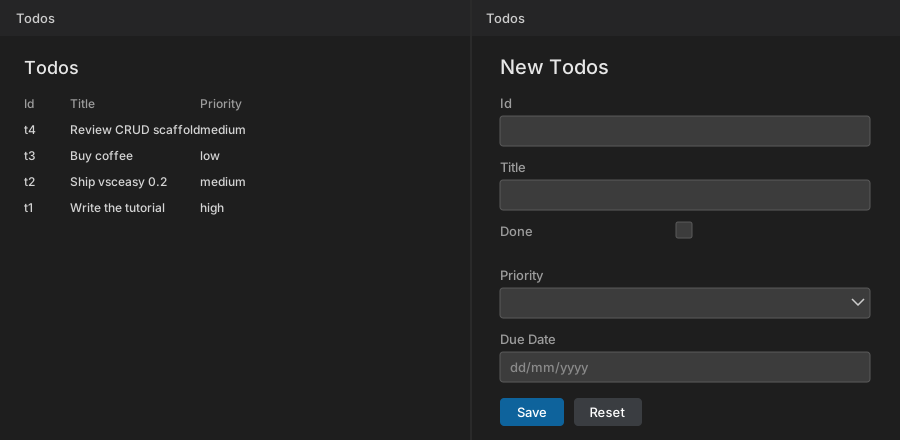
| Model field | Generated input |
|---|---|
title: string | text box |
done: boolean | checkbox |
priority: "low"|"medium"|"high" | <select> with the three options |
dueDate?: Date | native date picker |
See it run
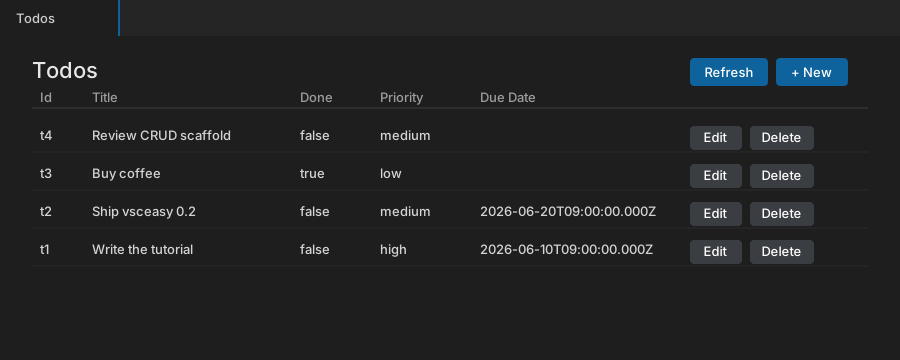
After a reload (or bun run launch) the Todos view shows the list:
Clicking + New (or Edit on a row) opens the form beside it. Each field rendered the input its type called for:
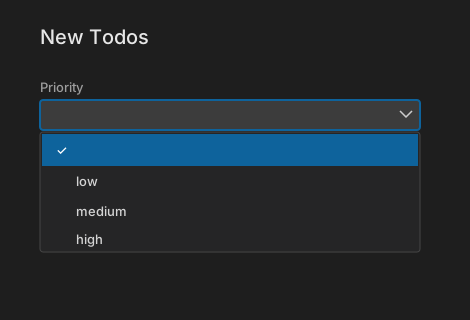
The Priority dropdown’s options come straight from the union in the model —
low, medium, high, nothing hand-written:
Behavior you get for free
- Live list. The list reloads on focus/visibility and after a save, plus a manual Refresh — because webviews keep state when hidden.
- Host-side delete. Confirmation is a native modal, since browser
confirm()is disabled in webviews. - Edit pre-fill. Edit stashes the row id; the form pulls it on mount and
pre-fills via
get(id). Creating a new row clears the form afterward.