
5. Menus — the navigation model
So far crud add created a menu for us (--menu new:todos). Now we’ll build one
by hand and learn the model behind it — because the menu is how everything in a
vsceasy extension connects.
The mental model
A menu is one icon in VS Code’s activity bar (the left strip) and the container that opens when you click it. Everything the user reaches lives under a menu:
flowchart TD
  M["Menu (activity-bar container)"]
  M --> T["Tree of items"]
  T --> P["panel → opens a webview tab"]
  T --> C["command → runs a command"]
  T --> U["url → opens a link"]
  T --> G["group → collapsible folder"]
  M --> SP["Subpanel → inline webview view"]
  M --> TV["Tree view → data-driven tree"]
A menu holds two distinct things:
- A tree of navigation items — each item points at something by id: a
panel, acommand, aurl, or agroupof nested items. The menu never contains the panel or command; it only references it. That indirection is the whole idea — panels and commands don’t know about menus, and you can wire the same panel into several menus. - Attached views — subpanels (inline webviews) and tree views render inside the same container, below the item tree. (Covered in the next step.)
Create a menu
vsceasy menu add --name tools --title "Tools" --icon tools✓ Menu "tools" added.
Created: + src/menus/tools.ts
Registry + package.json updated.The generated file is a skeleton with two empty groups:
import { defineMenu } from '../shared/vsceasy';
export default defineMenu({  title: 'Tools',  icon: 'tools',  items: [    { label: 'Panels', children: [ /* … */ ] },    { label: 'Actions', children: [ /* … */ ] },  ],});
Wire items into it
menu edit adds one item at a time. The --kind flag picks what the item points
at:
# a panel link — opens the Todos list webviewvsceasy menu edit --name tools --kind panel \  --panel todosList --label "All Todos" --icon list-unordered --group Panels
# a command — runs the hello commandvsceasy menu edit --name tools --kind command \  --command hello --label "Say Hello" --icon play --group Actions
# a url — opens an external linkvsceasy menu edit --name tools --kind url \  --url "https://vsceasy.dev" --label "Docs" --icon book --group Actions
The file now shows the three connection types side by side:
export default defineMenu({ title: 'Tools', icon: 'tools', items: [ { label: 'Panels', children: [ { label: 'All Todos', icon: 'list-unordered', panel: 'todosList' }, ], }, { label: 'Actions', children: [ { label: 'Say Hello', icon: 'play', command: 'hello' }, { label: 'Docs', icon: 'book', url: 'https://vsceasy.dev' }, ], }, ],});The item kinds
| Field on the item | What clicking it does |
|---|---|
panel: 'id' | Opens that panel (a webview tab in the editor area). |
command: 'id' | Runs that command’s run() handler. |
url: 'https://…' | Opens the link in the browser. |
children: [ … ] | A group — collapses/expands; holds nested items. |
run: (vscode, ctx) => … | Inline handler, for one-off logic without a separate command. |
icon, description, and collapsed are optional on any item.
What gen writes
bun run gen turns every src/menus/*.ts into VS Code’s contributes. For our
two menus (tools and the CRUD-generated todos) it produced:
"viewsContainers": { "activitybar": [ { "id": "tododemo-tools", "title": "Tools", "icon": "$(tools)" }, { "id": "tododemo-todos", "title": "Todos", "icon": "$(symbol-misc)" } ]},"views": { "tododemo-tools": [ { "id": "tododemo-tools", "name": "Tools" } ], "tododemo-todos": [ { "id": "tododemo-todos", "name": "Todos" } ]}- Each menu becomes one activity-bar container with id
<prefix>-<menuId>. - The icon string becomes
$(codicon)form. - The item tree itself is rendered at runtime by a
TreeDataProvider, not baked intopackage.json— so you change items by editing the.tsfile and re-runninggen, never by hand-editing JSON.
See it run
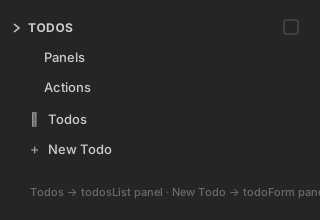
The todos menu (built by crud add) shows its item tree in the activity bar —
the Todos and New Todo items point at the todosList and todoForm panels:
Why the indirection matters
Because items reference targets by id:
- The same
todosListpanel is reachable from thetodosmenu and thetoolsmenu — define once, link anywhere. - Renaming or restyling a menu never touches the panels.
- A command can be triggered from the command palette, a menu item, a status bar
item, or a tree node — all pointing at the same
command: 'id'.
This is the backbone for the next two steps: the status bar item and the sidebar views both plug into this same id-reference model.
Next: add a status bar item →