
7. Sidebar views — subpanel & tree view
A menu’s container can hold more than the item tree. Two kinds of views dock inside it:
- a subpanel — an inline React webview (like a panel, but in the sidebar),
- a tree view — a data-driven tree you fill from code.
Both attach to a menu by id (menu: 'todos') and stack under that menu’s item
tree in the same activity-bar container.
| Subpanel | Tree view | |
|---|---|---|
| Renders | A React webview (your HTML/JSX) | Native VS Code tree nodes |
| You write | UI + optional typed RPC | getChildren() returning nodes |
| Best for | Custom layouts, charts, forms | Hierarchical lists, navigation |
Add a subpanel: live stats
vsceasy subpanel add --name todoStats --menu todos --title "Stats" --withApi yes✓ Webview view "todoStats" added.
Created: + src/subpanels/todoStats.ts + src/webview/subpanels/todoStats/App.tsx + src/webview/subpanels/todoStats/main.tsx Modified: ~ src/shared/api.ts--withApi yes adds a typed RPC interface so the webview can ask the host for
data. We define a stats() call and implement it over the same TodosRepo():
export interface TodoStatsViewApi { stats(): Promise<{ total: number; done: number; overdue: number }>;}export default defineSubpanel<TodoStatsViewApi>({ title: 'Stats', menu: 'todos', rpc: () => ({ async stats() { const now = Date.now(); const todos = await TodosRepo().findMany(); return { total: todos.length, done: todos.filter((t) => t.done).length, overdue: todos.filter( (t) => !t.done && t.dueDate && new Date(t.dueDate).getTime() < now, ).length, }; }, }),});The webview calls it through the typed client — no message plumbing:
const api = connectWebview<TodoStatsViewApi>();// …useEffect(() => { void api.stats().then(setS); }, []);Add a tree view: todos by priority
vsceasy treeview add --name byPriority --menu todos --title "By Priority"✓ Tree view "byPriority" added under menu "todos".
+ src/treeViews/byPriority.tsThe generated stub has a getChildren you fill with real data. Ours returns one
group per priority, and lazy-loads the todos in each group on expand. A node can
carry a panel so clicking it opens the form:
export default defineTreeView({  title: 'By Priority',  menu: 'todos',  getChildren: async (parent) => {    const todos = await TodosRepo().findMany();
    if (!parent) {      // Root: one collapsible group per priority, with a count.      return ['high', 'medium', 'low'].map((p) => ({        id: p,        label: p,        description: String(todos.filter((t) => t.priority === p).length),        collapsed: 'collapsed',      }));    }
    // Children: the todos in that priority — click opens the form.    return todos      .filter((t) => t.priority === parent.id)      .map((t) => ({ label: t.title, panel: 'todoForm' }));  },});
A TreeNode can carry icon, tooltip, description, collapsed,
contextValue, and a click target (panel, command, or a run handler) —
the same id-reference model as menu items.
What gen writes
Both views are added to the menu’s container in package.json. The todos
container now lists three views — the menu’s own tree, the webview subpanel, and
the tree view:
"views": { "tododemo-todos": [ { "id": "tododemo-todos", "name": "Todos" }, { "id": "tododemo-todos-todoStats", "name": "Stats", "type": "webview" }, { "id": "tododemo-todos-byPriority", "name": "By Priority" } ]}View ids follow <prefix>-<menu>-<viewId>, so a view always knows which menu
container it belongs to.
See it run
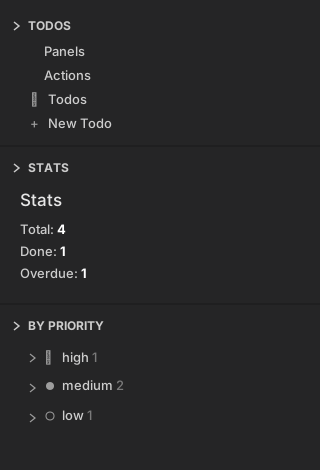
Open the Todos container. Under the menu tree you get the live Stats webview (totals pulled from the repo) and the By Priority tree:
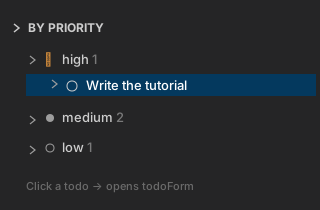
Expanding a priority group lazy-loads its todos; clicking one opens the form:
You’ve now seen the whole model
Everything connects through the menu container and id references:
- panels / commands / urls — reached from menu items, status bar, or tree nodes
- subpanels — inline webviews docked in a menu container
- tree views — data-driven trees docked in a menu container
- status bar — a shortcut bound to any of the above
That’s the full surface area of a vsceasy UI.
The Stats view still reads its numbers once, though — save a todo and they go stale. The last step makes it live.