
5. Menus — the navigation model
So far crud add created a menu for us (--menu new:todos). Now we’ll build one
by hand and learn the model behind it — because the menu is how everything in a
vsceasy extension connects.
The mental model
Section titled “The mental model”A menu is one icon in VS Code’s activity bar (the left strip) and the container that opens when you click it. Everything the user reaches lives under a menu:
flowchart TD
  M["Menu (activity-bar container)"]
  M --> T["Tree of items"]
  T --> P["panel → opens a webview tab"]
  T --> C["command → runs a command"]
  T --> U["url → opens a link"]
  T --> G["group → collapsible folder"]
  M --> SP["Subpanel → inline webview view"]
  M --> TV["Tree view → data-driven tree"]
A menu holds two distinct things:
- A tree of navigation items — each item points at something by id: a
panel, acommand, aurl, or agroupof nested items. The menu never contains the panel or command; it only references it. That indirection is the whole idea — panels and commands don’t know about menus, and you can wire the same panel into several menus. - Attached views — subpanels (inline webviews) and tree views render inside the same container, below the item tree. (Covered in the next step.)
Create a menu
Section titled “Create a menu”vsceasy menu add --name tools --title "Tools" --icon tools✓ Menu "tools" added.
Created: + src/menus/tools.ts
Registry + package.json updated.The generated file is a skeleton with two empty groups:
import { defineMenu } from '../shared/vsceasy';
export default defineMenu({  title: 'Tools',  icon: 'tools',  items: [    { label: 'Panels', children: [ /* … */ ] },    { label: 'Actions', children: [ /* … */ ] },  ],});
Wire items into it
Section titled “Wire items into it”menu edit adds one item at a time. The --kind flag picks what the item points
at:
# a panel link — opens the Todos list webviewvsceasy menu edit --name tools --kind panel \  --panel todosList --label "All Todos" --icon list-unordered --group Panels
# a command — runs the hello commandvsceasy menu edit --name tools --kind command \  --command hello --label "Say Hello" --icon play --group Actions
# a url — opens an external linkvsceasy menu edit --name tools --kind url \  --url "https://vsceasy.dev" --label "Docs" --icon book --group Actions
The file now shows the three connection types side by side:
export default defineMenu({ title: 'Tools', icon: 'tools', items: [ { label: 'Panels', children: [ { label: 'All Todos', icon: 'list-unordered', panel: 'todosList' }, ], }, { label: 'Actions', children: [ { label: 'Say Hello', icon: 'play', command: 'hello' }, { label: 'Docs', icon: 'book', url: 'https://vsceasy.dev' }, ], }, ],});The item kinds
Section titled “The item kinds”| Field on the item | What clicking it does |
|---|---|
panel: 'id' | Opens that panel (a webview tab in the editor area). |
command: 'id' | Runs that command’s run() handler. |
url: 'https://…' | Opens the link in the browser. |
children: [ … ] | A group — collapses/expands; holds nested items. |
run: (vscode, ctx) => … | Inline handler, for one-off logic without a separate command. |
icon, description, and collapsed are optional on any item.
What gen writes
Section titled “What gen writes”bun run gen turns every src/menus/*.ts into VS Code’s contributes. For our
two menus (tools and the CRUD-generated todos) it produced:
"viewsContainers": { "activitybar": [ { "id": "tododemo-tools", "title": "Tools", "icon": "$(tools)" }, { "id": "tododemo-todos", "title": "Todos", "icon": "$(symbol-misc)" } ]},"views": { "tododemo-tools": [ { "id": "tododemo-tools", "name": "Tools" } ], "tododemo-todos": [ { "id": "tododemo-todos", "name": "Todos" } ]}- Each menu becomes one activity-bar container with id
<prefix>-<menuId>. - The icon string becomes
$(codicon)form. - The item tree itself is rendered at runtime by a
TreeDataProvider, not baked intopackage.json— so you change items by editing the.tsfile and re-runninggen, never by hand-editing JSON.
See it run
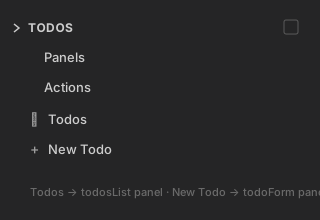
Section titled “See it run”The todos menu (built by crud add) shows its item tree in the activity bar —
the Todos and New Todo items point at the todosList and todoForm panels:
Why the indirection matters
Section titled “Why the indirection matters”Because items reference targets by id:
- The same
todosListpanel is reachable from thetodosmenu and thetoolsmenu — define once, link anywhere. - Renaming or restyling a menu never touches the panels.
- A command can be triggered from the command palette, a menu item, a status bar
item, or a tree node — all pointing at the same
command: 'id'.
This is the backbone for the next two steps: the status bar item and the sidebar views both plug into this same id-reference model.
Next: add a status bar item →