
3. Generate the CRUD UI
This is where the model becomes an app. One command scaffolds a service, a list panel, a form panel, the RPC contracts, and a menu to reach them.
Run it
Section titled “Run it”vsceasy crud add --model todo --menu new:todos--menu new:todos creates a new activity-bar container called Todos and
wires the list + form into it. (Use --menu none to skip the menu, or
--menu existing:<id> to add to one you already have.)
✓ CRUD scaffolded for todo.
  + src/services/TodoService.ts  + src/services/todoFormNav.ts  + src/panels/todosList.ts  + src/panels/todoForm.ts  + src/webview/panels/todosList/App.tsx  + src/webview/panels/todosList/main.tsx  + src/webview/panels/todoForm/App.tsx  + src/webview/panels/todoForm/main.tsx  ~ src/shared/api.ts  + menu "todos" wired with List + New entries
  Registry + package.json updated. Reload extension to try it.
crud add ran bun run gen for you, so package.json already contributes the
container, the views, and the commands.
What got generated
Section titled “What got generated”src/services/TodoService.ts business logic over TodosRepo()src/services/todoFormNav.ts list → form "edit this row" hand-offsrc/panels/todosList.ts list panel: RPC handlers (host side)src/panels/todoForm.ts form panel: RPC handlers (host side)src/webview/panels/todosList/ list React UI (runs in the webview)src/webview/panels/todoForm/ form React UI (runs in the webview)src/menus/todos.ts the activity-bar menusrc/shared/api.ts TodosListApi + TodoFormApi appendedThe contract (src/shared/api.ts)
Section titled “The contract (src/shared/api.ts)”Everything hangs off these two interfaces. The host implements them; the webview calls them — both type-checked against the same source.
export interface TodosListApi {  list(): Promise<Todo[]>;  delete(id: Todo['id']): Promise<boolean>;  openForm(id?: Todo['id']): Promise<void>;}
export interface TodoFormApi {  pendingId(): Promise<Todo['id'] | null>;  get(id: Todo['id'] | null): Promise<Todo | null>;  save(row: Todo): Promise<Todo>;  cancel(): Promise<void>;}
The service (src/services/TodoService.ts)
Section titled “The service (src/services/TodoService.ts)”Plain functions over the repo — the place to add validation or derived fields.
export const TodoService = { list: () => TodosRepo().findMany({ orderBy: 'id:desc' }), get: (id) => TodosRepo().findById(id), save: (row) => TodosRepo().upsert(row), delete: (id) => TodosRepo().delete(id),};The list panel (src/panels/todosList.ts)
Section titled “The list panel (src/panels/todosList.ts)”The panel’s rpc block implements TodosListApi on the host side. Note the
delete confirmation runs in the host — confirm() is disabled in webviews:
export default definePanel<TodosListApi>({ title: 'Todos', command: { title: 'Todos: List' }, rpc: (vscode) => ({ async list() { return TodoService.list(); }, async delete(id) { const pick = await vscode.window.showWarningMessage( `Delete Todos "${String(id)}"?`, { modal: true }, 'Delete', ); if (pick !== 'Delete') return false; return TodoService.delete(id); }, async openForm(id) { setPendingTodoId(id ?? null); await vscode.commands.executeCommand('tododemo.openTodoForm', id ?? null); }, }),});The React UIs
Section titled “The React UIs”The webview side just calls the typed client — no message-passing boilerplate:
const api = connectWebview<TodosListApi>();// ...setRows(await api.list()); // typed as Todo[]await api.delete(r.id); // typed argumentapi.openForm(r.id); // jump to the form, editing this rowThe generated form maps each model field to the right input automatically:
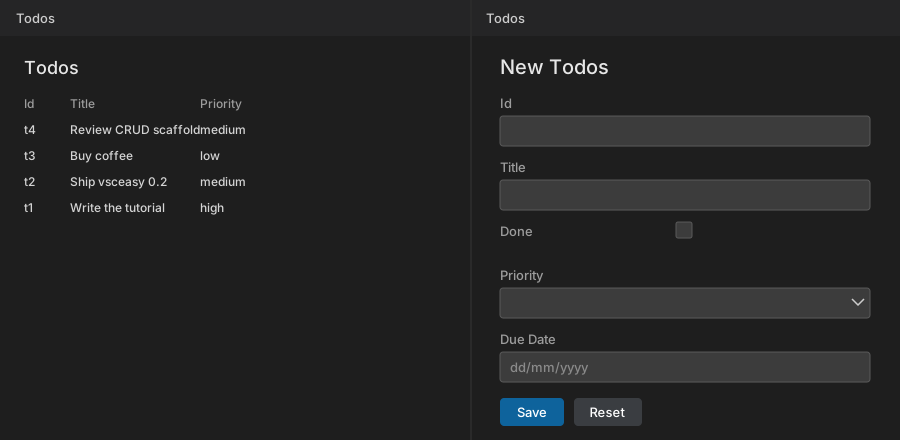
| Model field | Generated input |
|---|---|
title: string | text box |
done: boolean | checkbox |
priority: "low"|"medium"|"high" | <select> with the three options |
dueDate?: Date | native date picker |
See it run
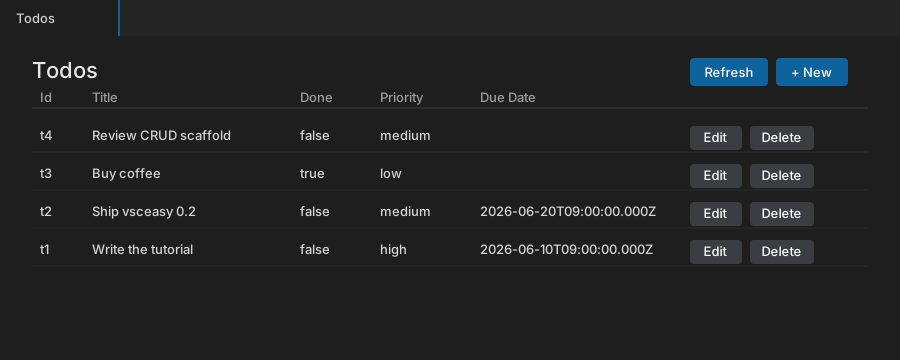
Section titled “See it run”After a reload (or bun run launch) the Todos view shows the list:
Clicking + New (or Edit on a row) opens the form beside it. Each field rendered the input its type called for:
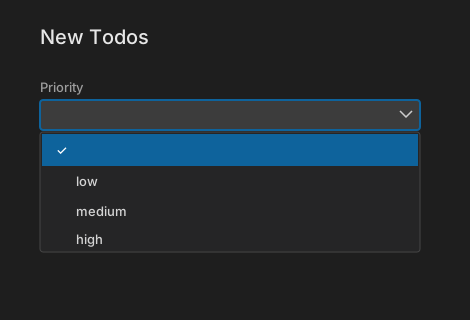
The Priority dropdown’s options come straight from the union in the model —
low, medium, high, nothing hand-written:
Behavior you get for free
Section titled “Behavior you get for free”- Live list. The list reloads on focus/visibility and after a save, plus a manual Refresh — because webviews keep state when hidden.
- Host-side delete. Confirmation is a native modal, since browser
confirm()is disabled in webviews. - Edit pre-fill. Edit stashes the row id; the form pulls it on mount and
pre-fills via
get(id). Creating a new row clears the form afterward.